Docker ULCL Deployment
Note
ULCL provides an Uplink Classifier for splitting the traffic of specific DN.
Architecture Overview
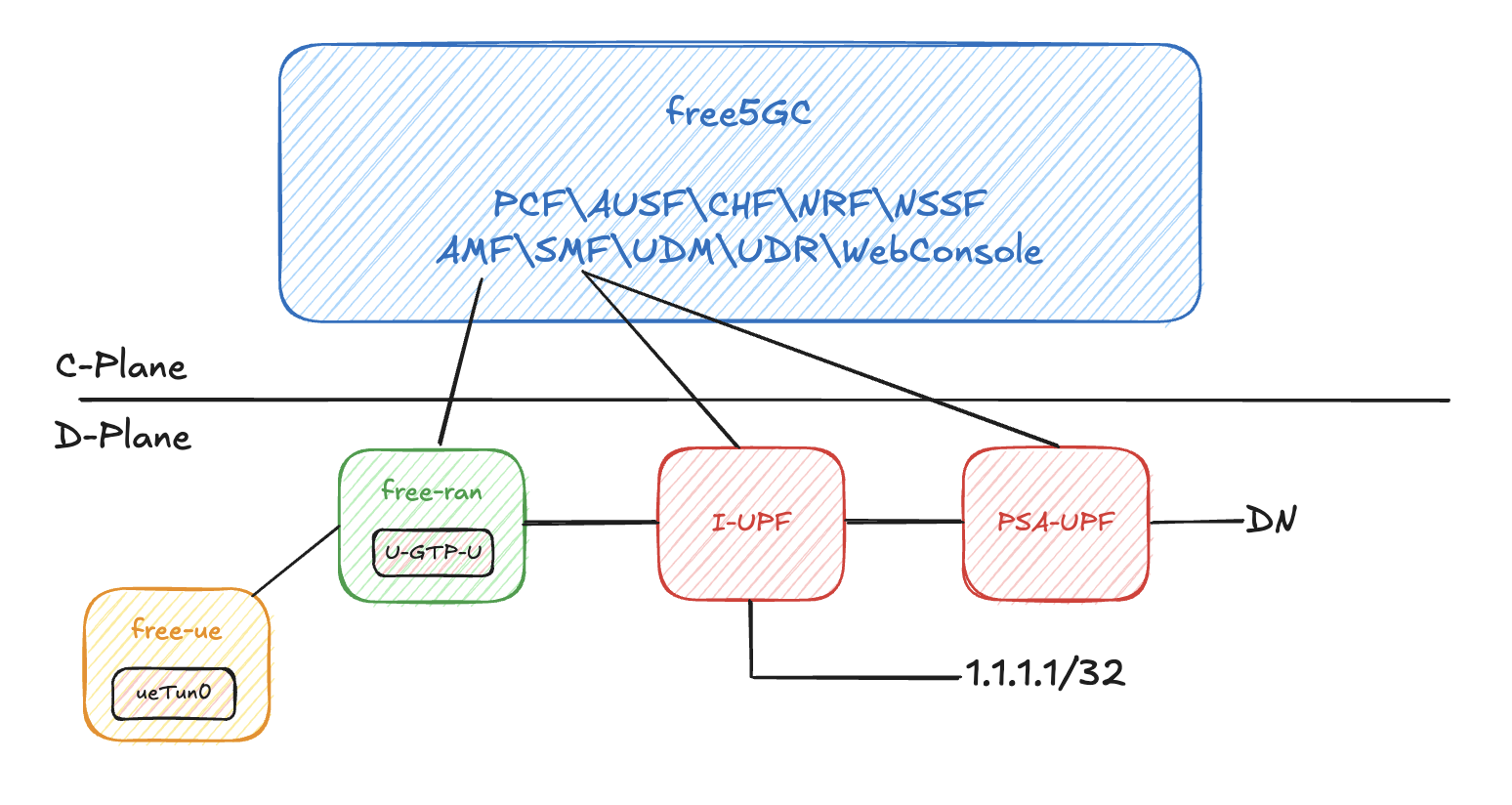
In ULCL, we define a specific traffic route for the destination 1.1.1.1/32. All traffic destined for 1.1.1.1/32 will be routed through the path gNB - I-UPF - DN. Other traffic will be routed through gNB - I-UPF - PSA-UPF - DN.
Here is the deployment of ULCL version:
A. Prerequisites
-
Docker:
-
Install
sudo apt update sudo apt install apt-transport-https ca-certificates curl software-properties-common curl -fsSL https://download.docker.com/linux/ubuntu/gpg | sudo apt-key add - sudo add-apt-repository "deb [arch=amd64] https://download.docker.com/linux/ubuntu $(lsb_release -cs) stable" sudo apt update sudo apt install docker-ce sudo systemctl start docker sudo docker --version -
Docker group (avoid sudo problem)
-
-
gtp5g
-
Packages
-
Clone, Build and Install
-
B. (Optional) Build free-ran-ue Image
If you want to build the image from source code, you need to run this step; otherwise, the compose file will pull the image from docker hub with the latest tag. You can also modify the tag in the compose file for specified version.
-
Clone
-
Clone the source code and put it under
fru-composedirectory -
Build image under
fru-composedirectory locallyAfter building, use
docker imagescli to check image. The image will be named withalonza0314/free-ran-ue:latest.
C. Start ULCL Compose
Clone the compose repo:
Start the compose:
For the specific ue routes, please configure at fru-compose/config/ULCL/uerouting.yaml.
In default, there is a specific path for destination 1.1.1.1/32.
D. UE
After docker compose started, UE can be started by entering the ue container.
-
Enter
uecontainer -
Start UE
-
Check Network Interface
Expected output included:
ueTun0: flags=4305<UP,POINTOPOINT,RUNNING,NOARP,MULTICAST> mtu 1500 inet 10.60.0.1 netmask 255.255.255.255 destination 10.60.0.1 inet6 fe80::b1e9:2933:3c64:b981 prefixlen 64 scopeid 0x20<link> unspec 00-00-00-00-00-00-00-00-00-00-00-00-00-00-00-00 txqueuelen 500 (UNSPEC) RX packets 0 bytes 0 (0.0 B) RX errors 0 dropped 0 overruns 0 frame 0 TX packets 0 bytes 0 (0.0 B) TX errors 0 dropped 0 overruns 0 carrier 0 collisions 0 -
Application
Now, the whole deployment is finished. Network interface
ueTun0can be used for any application, e.g. ICMP / iperf.